

Metadata is the data describing and categorizing an organization’s data – it’s the raw material. A data catalog aggregates and organizes that metadata to make data easier to discover, understand, and access. You can have metadata without a catalog, but you can’t have a functional catalog without metadata. See our full comparison: data catalog vs. metadata management.
A data catalog is not just a list of datasets. This complete, end-to-end guide explains what a data catalog is, how metadata works, how real organizations use them – and what it actually takes to implement one successfully in an enterprise environment.
What is a data catalog?
If you’re serious about proper data governance in your organization, you will need a data catalog at some point. Here’s what you should know about what a data catalog is and why it’s so essential to make the most of your company’s critical data.
Simply put, this is where all information about your organization’s data (metadata) should be.
A data catalog is not just a tool. It’s the cornerstone of effective data management. It’s the foundation for anything you want to do with your data – from labeling it or grouping it according to specific use cases to managing access to it for the right people.
With the enormous amounts of data enterprises deal with, it’s key to centralize information about it in one place, which is what a data catalog does. And if your data architecture is distributed across multiple catalogs and systems, they too need a central catalog as a trusted, single source – which is exactly what we help companies with using the Collibra platform.
Data catalog definition
When it comes to official industry definitions, a data catalog is an organized inventory of a company’s data assets. Its job is to help employees quickly discover, understand, and consume data. A data catalog serves as a metadata repository with details about data assets (like datasets or reports), including their structure, source, usage, and lineage.
Because data catalogs offer a centralized view of data, they make it easier for data professionals and other employees to find the right data assets or datasets without wasting hours searching across servers, databases, BI systems, APIs, folders, or files.
Data catalogs often include search functionalities, data classifications, and collaboration tools. They’re essential for improving data quality, especially as data and data sources multiply by the minute. Business glossaries additionally help provide more business context to make sure there’s a common understanding of the entire contents of the data catalog.
It’s also worth distinguishing a data catalog from closely related concepts: a data dictionary focuses on the technical definitions of individual data elements, while a data inventory is a simpler, often static list of data assets without the active metadata management layer a catalog provides.
In Collibra specifically, the Data Catalog application is a catalog of metadata that helps the business and data stewards discover, describe, assemble, and govern data sets.
What data sources does a data catalog integrate?
Within a data catalog, you can integrate data from multiple sources, for example:
- Databases
- Data lakes
- Enterprise applications
- ETL/ELT tools
- BI solutions
- Cloud storage services
- APIs and web services
- File systems and document repositories
- Streaming data platforms
- Master data management (MDM) systems
The metadata in a catalog provides information about details such as data format, structure, date of creation, etc. You can also enrich the integrated metadata with profiling information, data classes, and sample data and link the metadata to their business context.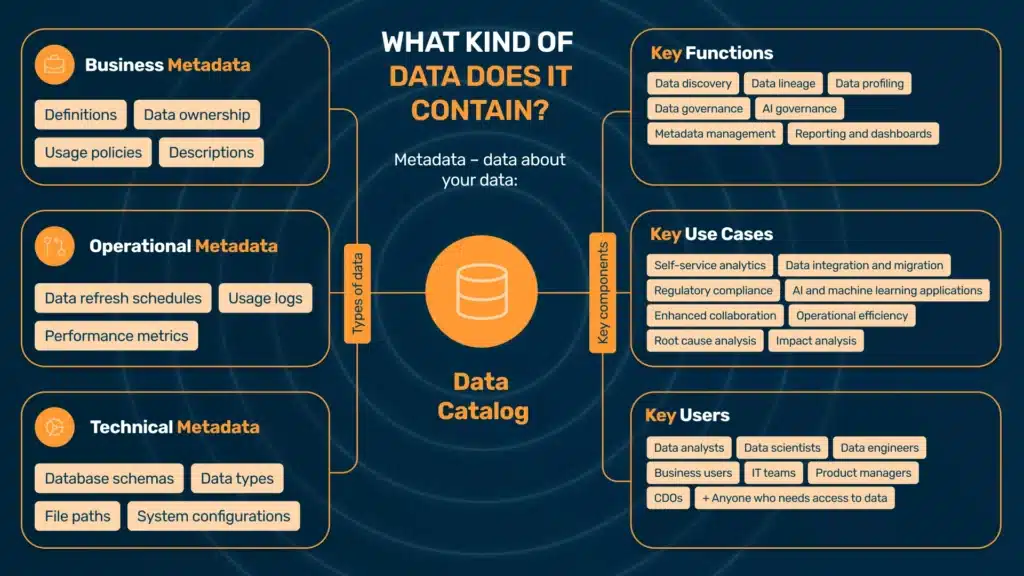
What is metadata?
To talk about data, especially in a business context, we first need to talk about metadata. Metadata is simply data about data. It provides descriptive, structural, and administrative details that help people understand and manage data more effectively. For a deeper look at how metadata management works as a discipline in its own right, see our dedicated guide on data catalog vs. metadata management.
For example, metadata might include a dataset’s:
- name
- creator
- creation date
- format
- size
- description of its contents
The most popular types of metadata include:
Business metadata
This type of metadata provides context for data from a business perspective. It might include:
- definitions of business terms
- data ownership usage policies
- descriptions for non-technical stakeholders
- different business dimensions such as geography, division/line of business, data vendor, etc.
Technical metadata
Technical metadata describes the technical aspects of data, which are essential for IT teams and data engineers who manage, integrate, or troubleshoot data systems. This might include:
- structure
- format
- storage details
Some examples of technical metadata are:
- database schemas
- data types
- file paths
- system configurations
Operational metadata
Operational metadata stores information about the processes and events associated with data usage. It’s particularly useful for monitoring data workflows and identifying potential issues in data pipelines. It might include details such as:
- data refresh schedules
- usage logs
- system performance metrics
Why you need a data catalog
Companies generate and store growing volumes of data, so naturally, efficiently tracking, accessing, and using this information becomes increasingly difficult. This is precisely why the role of a data catalog is so crucial. Here is how a data catalog can benefit your company:
Data discovery and accessibility
One of the most significant challenges coming with large data volumes is locating relevant data assets. Without a centralized system, employees might spend unnecessary hours searching through scattered databases, spreadsheets, or files.
With a data catalog, there’s a single, searchable repository where anyone can quickly find and access the exact data they need and focus on putting them to work, regardless of their technical expertise. Because the data has a business context attached to them, it’s also easy for employees outside strictly technical teams.
Data silos
It’s common for large corporations to work in silos – and this includes data silos. Data is isolated in different departments or systems and can’t easily be accessed across the company. This obviously limits its visibility and usefulness. Silos often lead to unnecessary work, inconsistencies in reporting, and missed business opportunities. It’s not uncommon to discover that the same data (like industry reports) is purchased several times by different departments.
A data catalog bridges these gaps and prevents data duplicates. It offers a unified view of all available data assets so departments and teams can stay aligned and work on the exact same data. For organizations dealing with this at scale, see our guide on enterprise data catalog implementations specifically.
Understanding data context
Accessing data is one thing, but you need to understand its purpose, structure, and relevance to actually be able to use it efficiently. When there’s no metadata, it’s easy to misinterpret datasets or not be able to use them correctly – or not even find them in the first place.
Data catalogs provide rich metadata, including descriptions, lineage, relationships, and usage history, putting the data in a valuable context.
Data quality
It’s another common problem: when data comes from different data sources, is stored in different locations, and is not contextualized, inaccuracies, duplicates, or outdated information are bound to happen somewhere down the line.
Data catalogs include features such as data profiling and quality indicators, which help users evaluate how reliable or complete a dataset is before they use it. As a consequence, it helps minimize errors and build confidence in the data.
Read more about data quality in our comprehensive article “What is data quality?”
Regulatory compliance
Another important context for data is regulatory standards across different countries and markets, like GDPR or HIPAA. Complying with those is an extra layer on top of other data management and governance concerns.
A data catalog makes data sources, classifications, and usage policies transparent. It’s easy to track who accesses data and how it’s stored, helping companies reduce the risk of non-compliance.
Reducing redundancy
Redundant data processing and storage are common inefficiencies in large organizations. Teams might not even know that they duplicate efforts to collect or clean data, and this is yet another result of the data silos.
A data catalog offers visibility into existing datasets so teams can reuse and build upon existing work rather than always starting from scratch.
Data catalog functions
As you can see from the challenges alone, a data catalog has multiple functions for a company’s data management processes. Here are some key areas it supports across the organization.
Data discovery
With their search and filtering options, data catalogs help quickly identify and locate datasets within an organization. The metadata is indexed, making datasets easily discoverable and reducing the time spent searching for information.
Metadata management
By their very nature, data catalogs include metadata – data about data. They automatically generate and update metadata so that it’s always accurate and relevant while teams can make sense of it and use its full potential.
Data lineage
Data lineage tracks data’s origins, transformations, and movements as it flows through enterprise systems. Data lineage applied on a data catalog visualizes these pathways, giving team members insight into how data is created, modified, and consumed. This helps immensely with troubleshooting, accuracy, and maintaining trust in data.
Data governance
A data catalog supports data governance by defining roles, access controls, and policies around data usage in a company. Its job is to make sure that data is secure, compliant, and used responsibly, according to organizational policies and regulatory requirements.
Reporting and dashboards
A data catalog often integrates with business intelligence tools. For a company, this means team members can generate reports and monitor key metrics directly from the catalog, which constitutes a unified, consistent data source.
AI governance
These days, AI plays an increasingly crucial role in data management, producing its own challenges. AI data governance focuses on the responsible use of data in machine learning and AI applications. A data catalog helps track data sources, use data ethically, and comply with AI-related regulations.
Modern data catalogs are also increasingly becoming augmented data catalogs – platforms that use AI and machine learning to automate metadata tagging, surface recommendations, and proactively flag data quality issues, rather than waiting for human stewards to do it manually.
Data profiling
Data catalogs often include profiling tools that provide summaries, such as data distributions, missing values, and anomalies. Data users can analyze the content, structure, and quality of data and assess how relevant it is to their specific purpose.
Data catalog use cases
Because a data catalog is the foundation of data management, it has plenty of use cases in an organization. Here are some common examples.
Self-service analytics
Data teams are often overwhelmed by requests from business users who need data for analytics or reporting. With a data catalog in place and data products built upon it, employees and teams can find the data by themselves, reducing the dependency on data teams and potential bottlenecks it often causes.
Data integration and migration
Data catalogs are essential during system upgrades, mergers, or migrations. They provide a clear map of data assets, their sources, and dependencies, reducing the complexity and risks associated with integrating or moving data across systems.
Regulatory compliance
Data catalogs also play a crucial role in meeting regulatory requirements by documenting data sources, lineage, and usage policies. With a data catalog in place, a company can easily demonstrate compliance with standards such as GDPR, HIPAA, or CCPA and reduce the risk of fines or penalties.
AI and machine learning applications
Data catalogs make high-quality, well-documented data available for AI and ML model training. They help data scientists identify suitable datasets, track data lineage, and maintain ethical AI practices. For a deeper look at this intersection, see our guide on data catalogs for machine learning.
Enhanced collaboration
Data catalogs promote knowledge sharing because they provide transparency into data ownership, definitions, and usage guidelines. With a centralized view of data assets, all stakeholders are aligned, and teams across departments can collaborate more effectively.
Operational efficiency
With a data catalog, teams can spend more time using data rather than searching for it. This usually significantly improves project timelines and resource allocation.
Root cause analysis
When there’s a data issue – like a broken dashboard or an obvious error – it can take hours or even days to track it back to its source, which might be a random row in an obscure Excel file. A data catalog with data lineage helps quickly locate it and even prevent issues from happening, thanks to data consistency across departments.
Impact analysis
A data catalog with data lineage also helps track data downstream and the impact any upstream changes have on it. This way, teams can foresee and fix potential problems when modifying data.
How a data catalog fits into your data architecture
A data catalog doesn’t exist in isolation. In enterprise environments, it sits at the center of a broader data architecture – and understanding where it fits relative to other tools and concepts is essential before making implementation decisions.
Data catalog vs. data lake and data warehouse
A data lake stores raw, unprocessed data at scale. A data warehouse stores structured, processed data optimized for analytics. Neither tells you what data you have, where it came from, or whether it’s trustworthy.
A data catalog is the layer that makes both useful. It sits on top of your storage and processing infrastructure and provides the metadata, lineage, and governance context that transforms raw storage into something your organization can actually work with confidently. For a detailed breakdown, see our comparisons of data catalog vs. data lake and data catalog vs. data warehouse.
Data catalog in a data mesh or data fabric
Increasingly, large enterprises are moving toward distributed data architectures – most notably data mesh, where data ownership is decentralized across business domains, and data fabric, which emphasizes automated, intelligent connectivity across heterogeneous systems.
In both models, a data catalog becomes even more critical, not less. When data ownership is distributed, the risk of fragmentation, inconsistent definitions, and untracked lineage increases dramatically. The data catalog acts as the connective tissue – the single place where all domain-owned data assets are registered, described, and governed, regardless of where they physically live.
At Murdio, we work with organizations that are mid-migration to data mesh architectures. One of the most consistent findings: teams that skip the catalog layer during the transition end up rebuilding it later, at significantly higher cost and complexity.
Data catalog vs. data marketplace
A data marketplace takes the concept further – it’s a layer built on top of a data catalog that enables internal or external data sharing, often with formalized data products, access controls, and sometimes even monetization. The catalog is the prerequisite: you can’t build a marketplace without knowing what data you have and being able to describe it reliably.
How to choose a data catalog
Choosing a data catalog is not primarily a technology decision – it’s an organizational one. The right tool depends heavily on your data architecture, governance maturity, team structure, and what problems you’re actually trying to solve first.
Key evaluation criteria
Before evaluating vendors, define your requirements. Our data catalog requirements guide walks through this in detail, but the core dimensions to assess are:
Scale and architecture fit – How many data sources do you need to connect? Are you on-premises, cloud, or hybrid? Some tools are optimized for cloud-native environments (Snowflake, BigQuery, Databricks), while others are built for complex hybrid enterprise estates.
Metadata model flexibility – Can the catalog represent the relationships and asset types relevant to your business? Not all catalogs handle custom asset types, complex lineage, or domain-specific classification schemes equally well.
Governance capabilities – If data governance is a core requirement (GDPR compliance, access policy management, stewardship workflows), you need a catalog with first-class governance features – not just a discovery tool with governance bolted on.
Integration depth – Does it connect natively to the systems you already use? Shallow integrations that only pull table names are not the same as deep integrations that capture lineage, column-level metadata, and usage statistics.
User adoption model – A catalog that only data engineers can use defeats the purpose. Evaluate whether business users, analysts, and non-technical stakeholders can realistically work with the interface and find value without constant IT support.
Vendor ecosystem and support – For enterprise deployments, implementation support, training, and the vendor’s roadmap matter as much as current features. See our overview of data catalog tools for a comparison of the major platforms available in 2026.
Build vs. buy
Some organizations consider building an internal data catalog, particularly if they have strong engineering teams and highly specific requirements. In most enterprise cases, however, buying (or subscribing to) an established platform is the more practical path. The cost of building and maintaining a catalog that keeps pace with modern governance requirements – lineage automation, AI-assisted tagging, compliance reporting – is consistently underestimated. (A full build vs. buy analysis is coming soon.)
Pricing models
Data catalog pricing varies significantly by vendor and deployment model. Enterprise platforms like Collibra typically use custom, contract-based pricing tied to the number of users, assets, or connectors. Cloud-native tools often use consumption-based models. For a detailed breakdown of what to expect, see our guide on data catalog pricing.
How data catalog implementation works
Selecting a data catalog is one thing. Getting it to deliver real value in an enterprise environment is another. Implementation is where most organizations either build momentum or stall – and the difference usually comes down to how well the project is scoped, prioritized, and adopted.
The five stages of a data catalog implementation
Based on Murdio’s experience implementing Collibra across enterprise clients in financial services, manufacturing, and the public sector, successful data catalog implementations follow a recognizable pattern:
- Discovery and scoping
Before any technical work begins, the organization needs to define scope: which data domains, which business problems, and which user groups are in focus for the initial rollout. Trying to catalog everything at once is the single most common reason implementations fail to show value quickly. Start with the data assets that are most business-critical and most frequently misunderstood or mislabeled.
- Metadata ingestion and source connection
The catalog is connected to priority data sources. Automated metadata ingestion pulls in technical metadata – schemas, data types, lineage from ETL tools. This is the foundation layer; without reliable technical metadata, nothing else works.
- Business context enrichment
Technical metadata alone doesn’t make a catalog useful for business users. This stage involves data stewards working with business stakeholders to add definitions, ownership, usage policies, and classification tags. It’s also where the business glossary gets built out and linked to catalog assets.
- Governance and access policy configuration
Roles, stewardship assignments, and access controls are configured. Workflows for data certification, issue flagging, and change management are established. This is the stage where the catalog transitions from a discovery tool to a governed environment.
- Adoption and operationalization
The catalog only delivers value if people use it. This means training, communication, and often – embedding catalog usage into existing workflows. In our experience, organizations that tie catalog adoption to specific, felt pain points (e.g., “find the right dataset before building your report”) see significantly faster uptake than those that roll it out as a general platform.
For organizations planning a structured rollout, our detailed data cataloging process guide and data catalog best practices cover each stage in more depth. (A step-by-step implementation plan guide is also coming soon.)
Common implementation pitfalls
From our work with enterprise clients, these are the patterns that most reliably derail implementations:
Boiling the ocean – Connecting every data source from day one creates a catalog full of poorly described, ungoverned assets. Prioritize ruthlessly.
Skipping business context – A catalog that only IT can interpret is not a data catalog – it’s a system inventory. Business metadata enrichment is not optional.
No assigned stewardship – Data governance doesn’t happen automatically. Without named data owners and stewards responsible for keeping metadata current, catalogs degrade quickly after launch.
Treating it as a one-time project – A data catalog is operational infrastructure. It requires ongoing governance, periodic reviews, and a feedback loop between users and stewards. Organizations that treat the implementation as “done” at go-live consistently see adoption drop within six months.
Data management starts with a data catalog
You might think of the concept of a data catalog as data management basics – and you’d be right. But precisely because it’s the basics, it’s also essential to get this piece right before you move on to more complex data governance scenarios and areas of data management that won’t happen without it.
If you need support with data catalogs and data governance in general, book a call with a Murdio expert and let’s talk about specific solutions to improve your data quality and use.
Frequently Asked Questions
A data catalog is a comprehensive inventory of data assets across the organization. A data dictionary is a more focused tool providing detailed descriptions of individual data elements – essentially a technical glossary. In essence, a data catalog is like a library, while a data dictionary is like a glossary for a specific book.
A data inventory is typically a simpler, often static list of data assets – useful for compliance audits or initial discovery. A data catalog is an active, continuously maintained environment with metadata management, lineage, governance workflows, and user collaboration features built in.
A data catalog benefits nearly every role that interacts with data. Typical users include: data analysts, data scientists, data engineers, business users, IT and data governance teams (including data stewards), product managers, and Chief Data Officers. The goal is to make data discoverable and trustworthy for all of them, not just technical teams.
Pricing varies significantly by vendor, deployment model, and organizational scale. Enterprise platforms typically use contract-based pricing tied to users, assets, or connectors. Cloud-native options may use consumption-based models. See our dedicated guide on data catalog pricing for a detailed breakdown.
Before selecting and deploying a catalog, organizations should define which data domains to prioritize, identify key stakeholders and data owners, assess their current metadata landscape, and clarify what governance outcomes they need. Our data catalog requirements guide covers this in detail.
An augmented data catalog uses AI and machine learning to automate tasks that previously required manual effort – such as metadata tagging, data classification, relationship discovery, and quality scoring. Most modern enterprise catalog platforms are moving toward augmented capabilities as the default.
For AI/ML workflows, a data catalog is essential for discovering quality training datasets, tracking data provenance, documenting feature definitions, and maintaining responsible AI practices. See our guide on machine learning data catalogs for more.
The most common pitfalls include trying to scope too broadly from day one, neglecting business metadata enrichment, failing to assign clear data stewardship, and treating the implementation as a project rather than ongoing operational infrastructure. Our guide on data catalog challenges covers these in depth.
For most enterprises, buying an established platform is the practical choice – building and maintaining a catalog with modern lineage, AI-assisted tagging, and compliance reporting capabilities is consistently more expensive than it appears. A detailed build vs. buy analysis is coming soon.