

Organizations rely on increasingly complex data ecosystems – and this means that understanding where their data comes from, how it moves, and how it changes along the way becomes crucial – while also becoming more and more complicated, too. This is exactly what data lineage is designed to simplify – visualizing, tracing, and documenting data flow across systems so you can make better, more reliable business decisions.
In this article, we’ll break down what Collibra Data Lineage is, explore its main features, look at the tools that make it work, and show you examples of how it all comes together in practice.
Key takeaways
- Collibra Data Lineage is a capability within the Collibra platform that provides a comprehensive map of how data moves and transforms, from its source all the way to final reports.
- It offers both technical and business lineage, automated lineage extraction from various sources, and interactive diagrams to visualize data flow and conduct impact analysis.
- It builds trust, ensures data quality, and supports regulatory compliance (like GDPR) by creating transparency across complex data ecosystems.
- While Collibra offers many native integrations, Murdio specializes in building custom lineage solutions for complex systems like Snowflake and SAP.
What is Collibra Data Lineage?
It might seem like “just a nice-looking diagram”, but really, it’s an essential tool to keep data consistent and reliable across data tools and sources. Collibra Data Lineage is indeed a powerful capability within the Collibra platform, letting you see how data moves across your entire organization – from data sources to reports, dashboards, and analytics. Collibra provides both technical lineage and business lineage, giving you a full end-to-end view of data flow and transformation.
You can read more about the types of data lineage and the difference between technical and business lineage in this article: Data Catalog vs Data Lineage: Tools for Complete Data Intelligence.
You can think of data lineage as a map of your organizational data. Each point on the map represents a system, source, or process where data is created, transformed, or consumed. The lines between them show the movement and relationships – how one dataset connects to another, and how data moves through pipelines or BI tools.
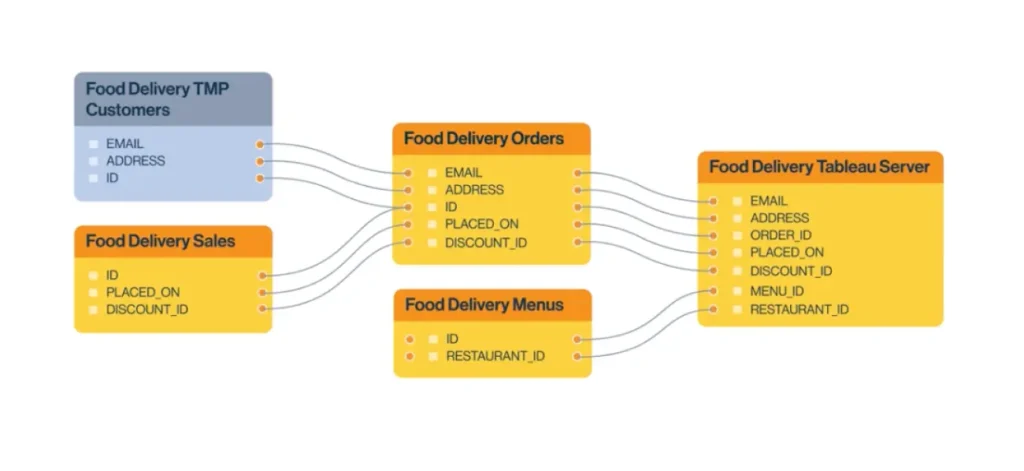
A basic example of Collibra Data Lineage. Source: Collibra
Why it matters
Without lineage, your data landscape basically turns into a black box. Analysts and engineers might struggle to identify where a number in a report came from or how a transformation affected data accuracy. And this can impact multiple areas of the business.
Data lineage fills that gap, creating transparency and trust across your organization.
With Collibra Data Lineage, you can:
- Trace data from source to reporting layer, understanding every transformation along the way.
- Identify downstream impacts of schema or code changes.
- Ensure data quality, data integrity, and compliance with regulations like GDPR.
- Automatically extract lineage from your systems to keep documentation up to date.
- Enable more accurate and strategic decision-making across the business.
The combination of technical insight and business context is what makes the Collibra data lineage solution a valuable tool for modern data governance.
What are the core Collibra Data Lineage features and capabilities?
Collibra Data Lineage is designed to handle both high-level business lineage and granular technical lineage, giving every stakeholder in the company the view they need.
Its core features include:
- Automated lineage extraction from selected sources with native integrations.
Collibra can automatically extract lineage from data sources, BI tools, ETL processes, and scripts. The automatically extracted lineage capability is especially useful when you have hundreds of pipelines, transformations, and reports across your environment.
Collibra scans the metadata, parses the code, and stitches together a connected view of data movement – including temporary tables, columns, and edges that show dependencies.
- Interactive lineage view, letting you explore datasets visually, filter by source or system, and see exactly how data moves through your environment.
The visualization can show direct edges between data assets, including downstream and upstream relationships, helping you plan transformations and migrations more effectively.
When a data source changes – maybe a column is renamed or a transformation is updated – Collibra’s lineage view helps you trace the impact downstream. You’ll see which reports or BI dashboards will be affected, helping teams maintain data accuracy and compliance before deploying updates.
- Summary business lineage to trace data flows with an interactive data map.
Business lineage provides the context – linking business terms, KPIs, and metrics to the technical assets behind them. It serves as the translation layer between business intelligence (BI) users and data engineers.
- Detailed technical lineage, focusing on the mechanics of the data flow. You can view transformations, drill down into table, column, and query-level lineage, and navigate through your data pipelines.
- In-line code context, allowing you to drill down into relevant table and column-level code within the lineage diagram.
- Integration with Collibra Data Governance, seamlessly connecting with other capabilities like cataloging, data quality, and data privacy management. In Collibra, data lineage is not just a standalone visualization, but it’s embedded in the broader governance framework that helps you plan, automate, and enable reliable data use.
- Exporting lineage diagrams in different file formats for reporting and regulatory purposes (PDF, PNG, CSV formats.)
What does the Collibra Data Lineage interface look like?
The Collibra Data Lineage interface provides a dynamic, graph-based visualization that allows users to view and explore data relationships across the organization. It’s intuitive enough for business users, yet detailed enough for engineers.
When you open a lineage diagram in Collibra, you’ll typically see:
- Nodes representing assets such as datasets, reports, systems, and ETL jobs.
- Lines that show the movement of data between these assets.
- The ability to zoom, filter, and switch between technical and business views.
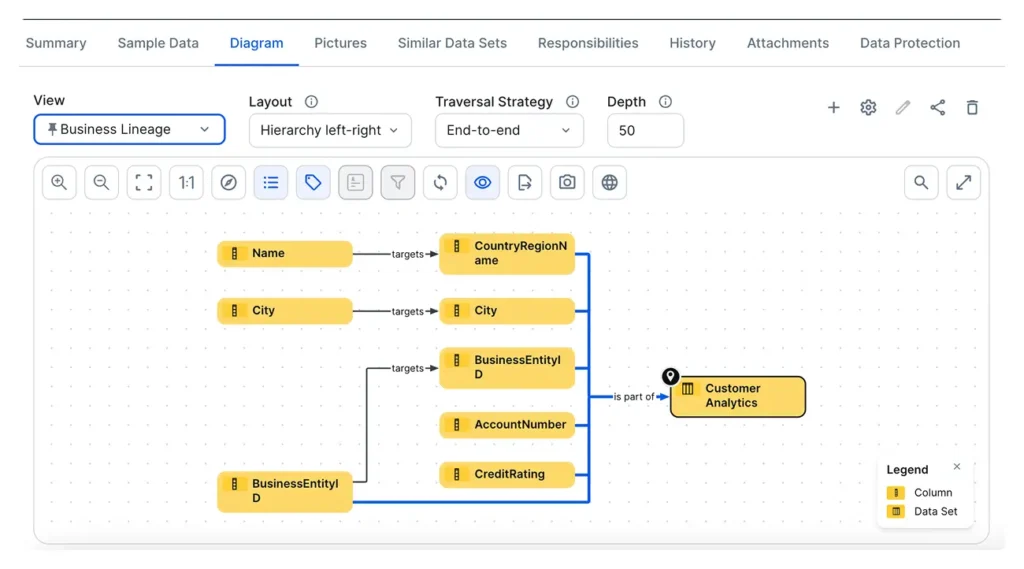
From this interactive interface, you can:
- Identify where a specific column or attribute originates.
- Trace its path through each transformation or process.
- Visualize dependencies to improve planning and transition efforts.
- Drill down to see documentation, metadata, and related assets.
What are the main Collibra Data Lineage tools?
Collibra doesn’t have separate “tools” per se when it comes to data lineage – but it integrates data lineage capabilities into its platform through Collibra Data Lineage, which automatically extracts lineage from a wide range of sources.
The key components of Collibra Data Lineage include:
- The use of Collibra Edge for metadata and technical lineage extraction from different data sources
- The generation of both technical lineage (column-level details) and business lineage (high-level business process views).
- Stitching to connect technical lineage with the Collibra Data Catalog for a holistic view.
What does a Collibra Data Lineage example look like?
Say, your company has several different CRM systems, but wants to create reports using a preferred source. Collibra Data Lineage can check if the reports use your preferred data source, while detailed technical lineage diagrams will show whether the preferred source actually uses customer data from the right databases.
Here’s what that might look like:
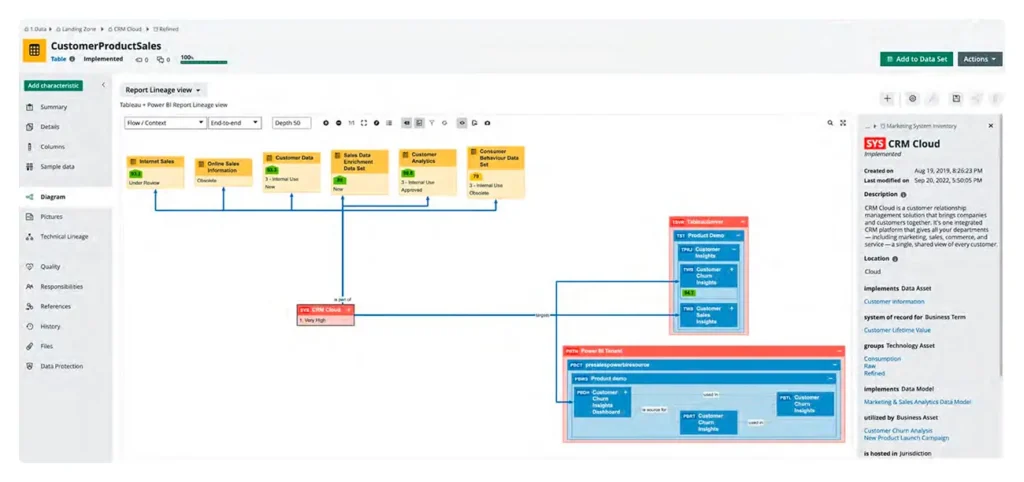
And for a more technical example, let’s say you’re migrating to a new SQL database. Collibra Data Lineage will:
- Identify all downstream applications and reports that rely on the old database
- Identify and notify all data and report owners
- Show detailed technical lineage with specific query-level interactions that need to be reviewed
And it might look like this:
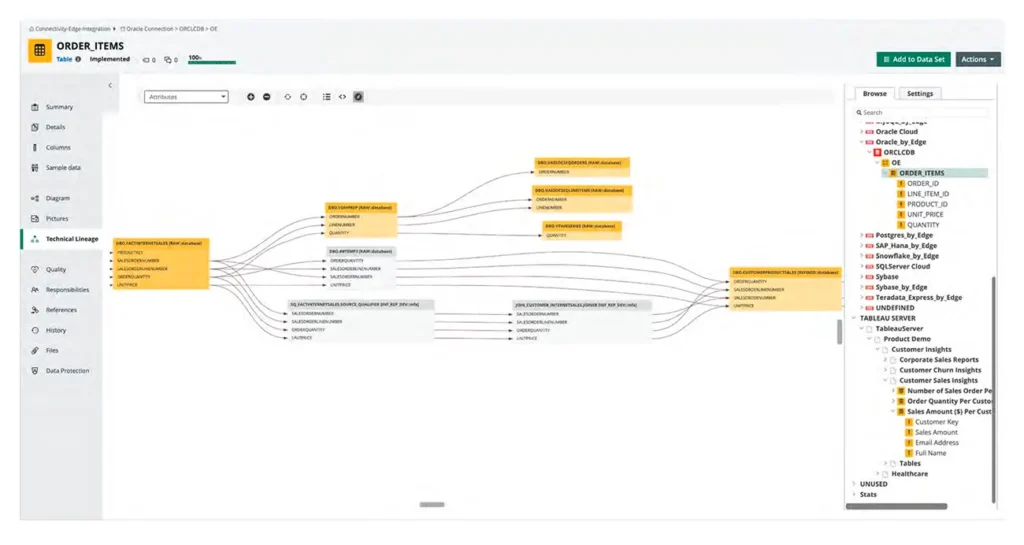
Other common Collibra Data Lineage use cases include:
- Regulatory compliance
- Self-service analytics
- Impact analysis
- Data exploration and viability
- Asset management
- And more.
And what if you need technical lineage using specific tools outside of Collibra? (Murdio case studies)
Snowflake custom technical lineage for Collibra
Collibra Data Lineage comes with many ready-made integrations. But if you need something different than what’s readily available, Collibra experts at Murdio can build custom integrations specifically with lineage in mind. Because sometimes, these can be tricky (not for us, though.)
For example, for one of our clients, a leading company in the pharmaceutical industry, we worked on applying Snowflake’s custom technical lineage in Collibra.
We needed to obtain information about data objects, attributes, and ETL processes from Snowflake in the Collibra data catalog. We also wanted to establish and streamline the flow of information between the data objects.
And even though we came across technical issues we needed to solve (with the help of Collibra’s support), we managed to deal with 65k queries for the client in just 3 hours, using a combination of two ingestion methods – SQL-API and shared storage.
For the client, the Snowflake custom technical lineage in Collibra was a way to optimize business processes, with no need to ever log in to Snowflake, and all metadata flow easily visible in the data catalog, creating a logical schema.
Read the full case study: Snowflake Custom Technical Lineage for Collibra (Case Study Included)
Cross-system technical lineage for Collibra and SAP
In another example, we built cross-system technical lineage for SAP and Collibra for an international retail chain as part of a wider Collibra custom development project.
To be useful, data lineage needs to span all the systems that the data flows through – and this usually means integrating your data catalog software with other solutions, such as SAP in this case.
Here, we built a solution that enabled reporting teams and other data consumers to visualize data flows across systems (e.g., SAP, Data Lakes, and Databases) for easier impact analysis.
You can read the full case study here: Collibra Implementation Team for an International Retail Chain
The bottom line
Though it looks like it at first glance, Collibra Data Lineage is much more than just a diagram of your data flows. It’s the foundation of a transparent, well-governed data ecosystem, because it empowers teams to make data-driven decisions with full confidence in data accuracy and origins.
And if you’re dealing with complex systems or custom integration requirements, Murdio can help you extend Collibra’s capabilities with tailored lineage solutions designed specifically for your environment.
Frequently asked questions
1. What’s the difference between technical and business lineage in Collibra?
Technical lineage shows detailed data movements at the column, table, and transformation level, and it’s mostly helpful for engineers and data architects. Business lineage, on the other hand, connects those technical assets with business terms, KPIs, and processes, helping non-technical users understand how data supports business goals.
2. How is lineage information extracted in Collibra?
Collibra automatically extracts lineage from data sources, ETL tools, BI platforms, and code repositories. It parses metadata and code to build an end-to-end lineage graph, which updates automatically as your systems evolve.
3. Can Collibra handle lineage across multiple systems or data platforms?
Yes. Collibra supports cross-system lineage through integrations with databases, cloud platforms (like Snowflake or BigQuery), and enterprise systems (like SAP). For more complex or custom setups, Collibra can be extended with tailor-made integrations – something Murdio regularly develops for clients.
4. Why is data lineage important for governance and compliance?
Data lineage enables traceability – showing where data originates, how it transforms, and where it ends up. This kind of visibility supports compliance with regulations like GDPR and helps organizations maintain consistent, trusted reporting across all business units.
5. How can Murdio support Collibra Data Lineage projects?
Murdio’s team specializes in Collibra implementation, customization, and advanced lineage development. Whether you need to connect Collibra with specific platforms (like Snowflake or SAP) or optimize lineage visualization and automation, Murdio can design and deliver a solution that fits your data landscape.
About the Author

Share this article
Related Articles
See all-

18 August 2026
| Case StudyCase Study: How a private bank repaired its Collibra implementation and prepared for operational data governance
-

18 August 2026
| Case StudyCase Study: How a global life-science company turned fragmented data into searchable assets with Collibra
-

31 July 2026
| CollibraBeyond Collibra Implementation: The 4 Stages of the Collibra Lifecycle