

Every organization needs a single source of truth when it comes to the data it uses. And this is – in short – exactly what a Collibra Data Catalog is for. But with multiple data governance solutions on the market, what makes Collibra the one you should consider? In this article, we’ll walk through the features that set it apart and how it can support your enterprise’s data governance journey.
What is Collibra Data Catalog?
A data catalog, at its core, is a centralized inventory of an organization’s data assets. (Read more in our complete guide: What is a data catalog?) But we think it’s much more than that – especially when you take the time to expand and adjust it to your organization’s specific needs in data management and governance.
The Collibra Data Catalog is a full-fledged, enterprise governance platform built around a metadata backbone, workflows, lineage, and AI/ML enhancements. And it goes way beyond just listing “what data exists” in the organization. It helps govern, understand, and use data with confidence. (For a deeper dive, explore all the Data Catalog Benefits in our detailed article.)
Here’s how Collibra stands apart:
- It bridges the business and technical worlds by embedding business glossaries and context into the catalog, not just schema metadata.
- It automates governance processes like approvals, stewardship, or policy enforcement, rather than relying on manual methods.
- It supports cross-system lineage and impact analysis.
- It allows collaboration, crowdsourcing of metadata, and iterative governance.
When you layer all that in, it’s clear that Collibra becomes more than a catalog – it’s more of a governance hub and a decision engine for data.
Let’s also distinguish a data catalog from a simple data inventory, because the two are not exactly the same. (See the key differences in the article on Data Inventory vs Data Catalog.)
Data catalog software like Collibra doesn’t just list assets – it builds context, trust, and workflows around them. And Collibra’s offering is purpose-built for organizations that need a trusted, scalable, and secure way to manage data as a strategic asset, supporting compliance, analytics, and digital transformation initiatives.
Murdio definition: The Collibra Data Catalog is the foundation of effective data management for organizations using Collibra. And when efficiently embedded into business processes, it’s instrumental to building and maintaining successful data governance programs.
What does Collibra Data Catalog’s architecture look like?
To understand how Collibra delivers on its promise, it helps to peel back the layers, so let’s do that in this section.
Collibra Data Catalog’s architecture combines metadata ingestion, processing, storage, and a user interface that delivers value across roles. Below is a logical breakdown of how it all fits together.
Metadata ingestion
The first job is to bring in metadata from all the relevant sources. In a nutshell, it works like this:
- Collibra supports connectors to a broad range of on-premise databases, data warehouses, data lakes, BI tools, file systems, cloud sources, and ETL platforms.
- For environments that reside behind firewalls or in restricted networks, Collibra uses Collibra Edge to securely pull metadata without exposing the internal landscape.
- As part of the ingestion process, auto-scanning kicks in: schema discovery, file scanning, profiling, classification of sensitive fields, and schema changes over time.
Processing
Once metadata flows in, Collibra applies processing, transformation, and governance logic:
- It classifies data assets automatically (e.g., PII, financial, operational) using rules and patterns.
- It enriches metadata with business context from glossaries, tags, and domain models.
- It triggers workflows, such as those for stewardship, approval, or certification.
- It resolves metadata conflicts, merges duplicates, and overall, maintains consistency.
This is where the boundary between data catalog and metadata management tends to get blurry – and Collibra generally leans toward the more intelligent, governed side. (You can read more in this article: Data Catalog vs Metadata Management.)
Storage
Processed metadata, business definitions, lineage graphs, governance artifacts, and audit trails are stored in Collibra’s platform database (or in a customer’s preferred repository, depending on deployment). And the Collibra Data Catalog:
- Maintains versioning and history (important for tracing how metadata evolves).
- Enforces permissions and role-based access control.
- Supports integrations upstream and downstream (via APIs and connectors) to push/pull metadata as needed.
User interface
The final – and arguably most visible – layer is the UI and experience layer. The interface is designed for multiple personas:
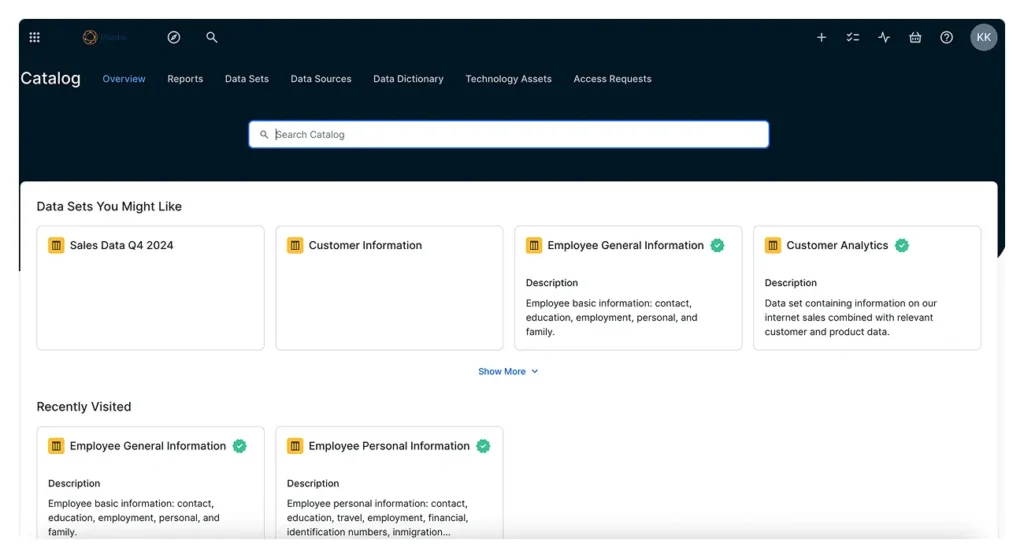
- Analysts and business users can search and browse data assets, view definitions, lineage, and quality scores.
- Stewardship teams see dashboards for pending actions, certification status, and policy compliance.
- Data engineers and architects can use more technical views (schemas, field-level metadata, data lineage maps, etc.).
- Collaboration features like comments, ratings, and suggestions bring metadata to life via user participation.
A closer look at Collibra Data Catalog features and capabilities
Now that you have the scaffolding, let’s explore the core features that make Collibra an enterprise-grade catalog.
Murdio tip: We’re talking about pretty standard features here. But as long-time Collibra experts, we know there are multiple changes and tweaks you can implement to customize the Collibra Data Catalog for the specific needs of your organization.
With 14 Collibra Rangers on board, fluent in integrating the technical aspects of Collibra with business requirements, we can help you maximize the data catalog’s potential with scalable metamodels and customized software integrations.
Automated data discovery and classification
- Auto-scanning: As Collibra connects to new sources, it scans schemas, data types, usage statistics, and field relationships.
- Classification & tagging: Based on patterns, rules, or ML models, it can classify sensitive data, business domains, or custom categories.
- Change detection: It tracks source changes over time, alerting teams to new tables, fields, or modifications.
- Scheduling & incremental scans: You can control how often scanning happens and whether full or delta scans are used.
Business glossary and data dictionary
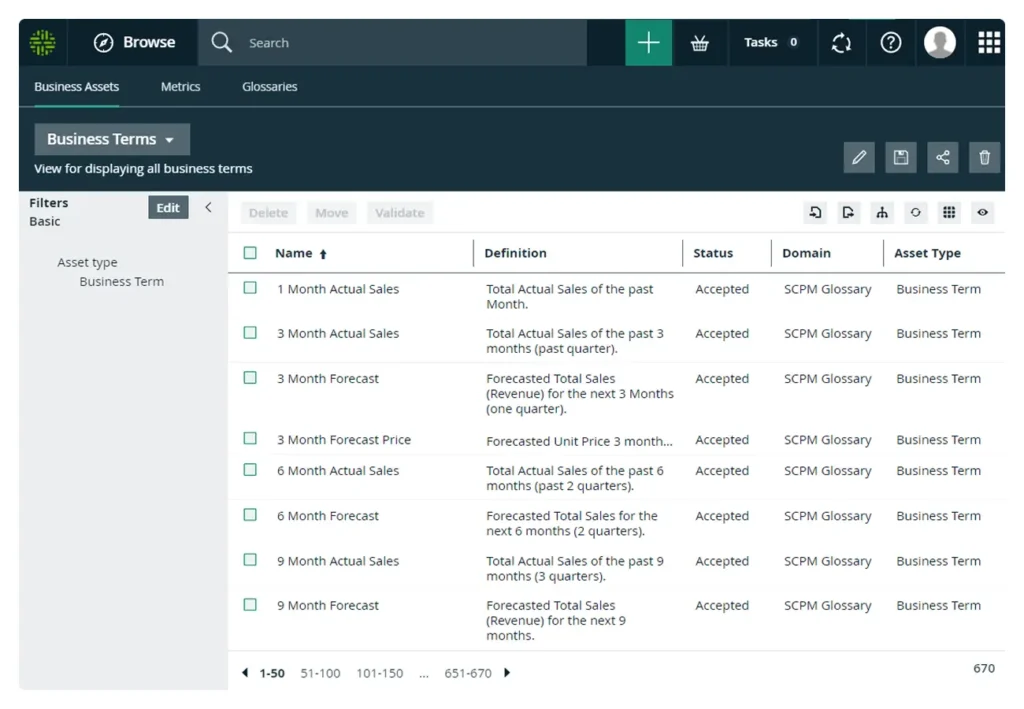
A standout piece is Collibra’s integrated business glossary. (Learn why this is different in our Business Glossary vs Data Catalog article.) Here’s how it plays out:
- Business users define terms (e.g., “customer revenue,” “order date,” “active user”) and manage relationships (synonyms, hierarchies).
- Technical teams align schema-level elements to glossary terms, linking columns to business definitions.
- The data dictionary complements this by providing technical metadata (data types, constraints, lineage, statistics).
Data lineage and impact analysis
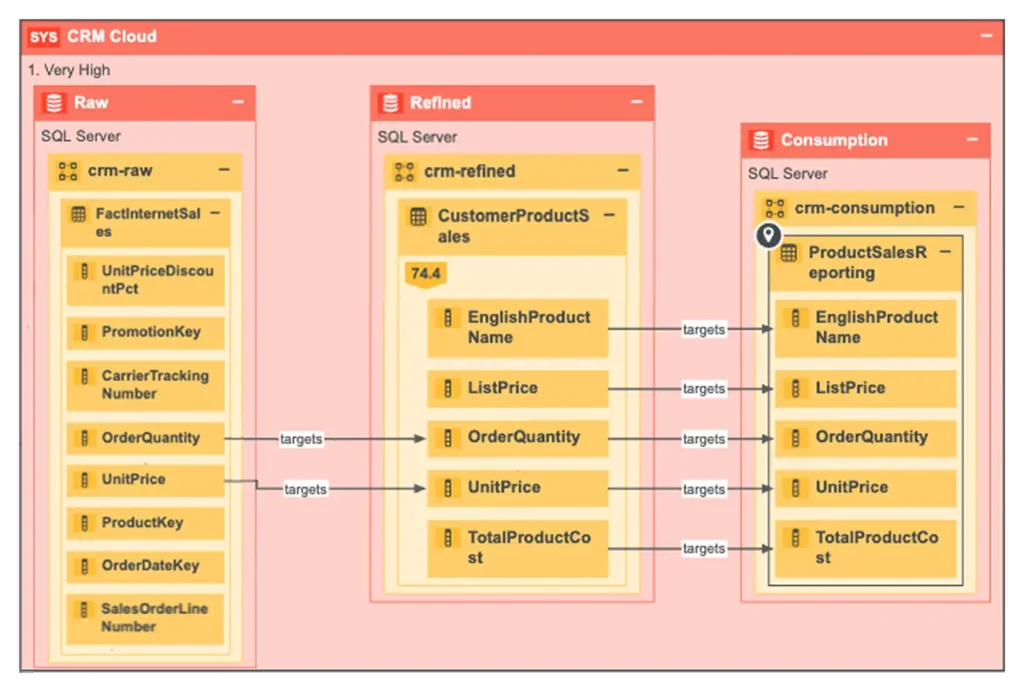
Collibra provides end-to-end data lineage, from source to transformation to target. (If you want to dig deeper into lineage concepts, check out Data Catalog vs Data Lineage.)
In this respect, Collibra’s capabilities include:
- Visualization of lineage graphs, with the ability to drill into steps, transformations, and joins.
- Upstream and downstream impact analysis.
- Cross-system lineage: it can trace lineage across ETL, cloud, BI tools, and databases.
- Lineage versioning: track how lineage changes over time.
This is especially valuable when making changes in complex landscapes or dealing with regulatory audits.
Data quality and profiling
Collibra goes beyond just metadata to include data quality capabilities in its Data Quality and Observability tool that you can use alongside your Collibra Data Catalog. It includes:
- Profiling: Scanning data to compute metrics (null counts, distinct values, distribution, patterns).
- Quality rules and thresholds: You can define rules and flag violations.
- Monitoring & alerting: Set up dashboards, track historical trends, and trigger alerts when data quality degrades.
- Linking to governance: Tie quality issues to workflows, e.g., remediation tasks, certification disapproval, or stakeholder notifications.
If you’re curious how data quality is measured in practice, see our guide on Data quality metrics.
Collaboration and social features
Collibra isn’t a static repository – it’s designed for collaboration across the enterprise:
- Users can comment, suggest metadata updates, rate data assets, or flag issues.
- Stewardship workflows let teams review and approve changes.
- Metadata crowdsourcing encourages domain experts across departments to contribute to definitions, enrich context, or validate tags.
- Notifications and task dashboards help governance stay alive, not just “set and forget.”
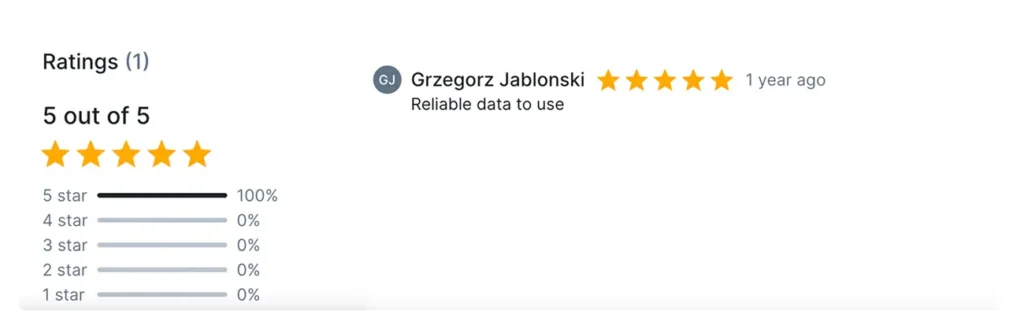
On top of that, Collibra uses machine learning to assist with classification, suggestions, or metadata quality, paving the way for an augmented data catalog (similar in spirit to the machine learning data catalog concept).
Finally, for mature organizations, Collibra offers a data marketplace experience: a “shopping for data” front end where business users can browse, request, and consume curated datasets. (See also our article on the Collibra data marketplace.)
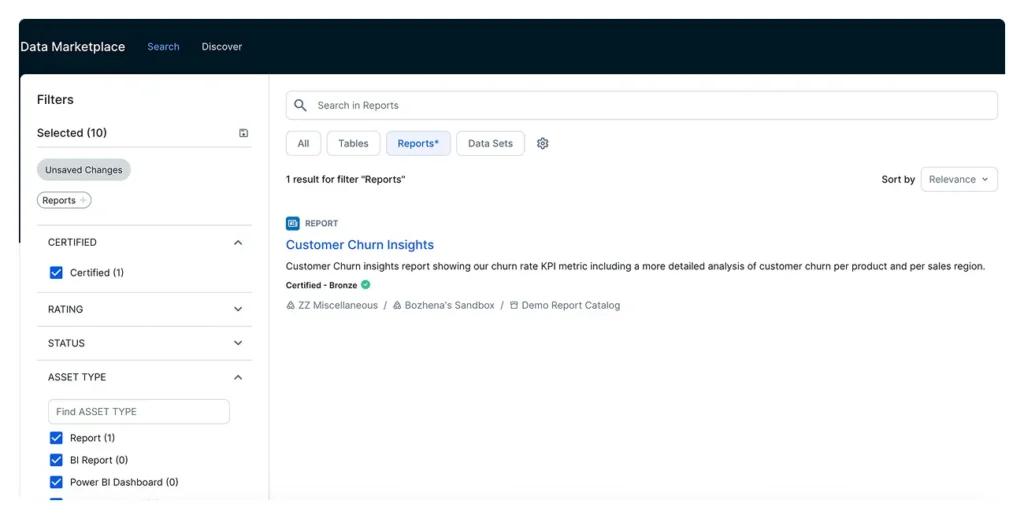
The UX: Navigating the Collibra Data Catalog interface
One thing we consistently hear from clients is: “We have metadata tools, but users don’t adopt them.” And this is exactly why Collibra Data Catalog is built with ease of use in mind, to make it much more convenient to use for teams, including those that are not technical or particularly data literate.
Here’s what it includes.
- Smart search: free-text search across assets, glossary terms, tags, lineage, quality metrics.
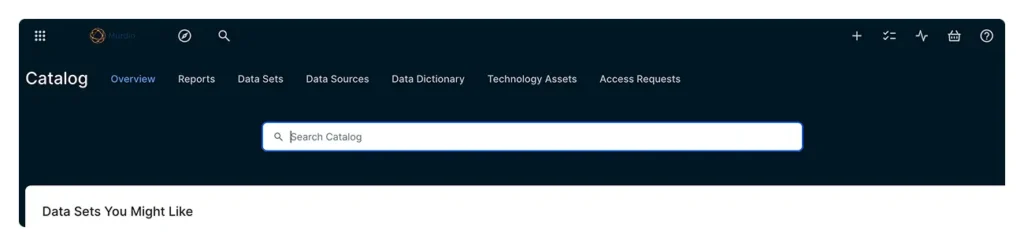
- Filtered browsing: facets by domain, steward, data source, certification status, etc.
- Asset view pages: these are “one-click” windows into a table/field’s lineage, definitions, quality, usage, relationships, and stewardship info.
- Lineage graphics and topology views: interactive graphs let users zoom, collapse, or navigate steps.
- Dashboards: Stewardship dashboards show tasks, compliance scores, overdue actions, and insights at a glance.
- Role-based UIs: You’ll see different features depending on whether you’re a data steward, analyst, or governance lead.
Because the interface is intuitive and role-tailored, adoption is higher, and metadata becomes a living, usable product.
Murdio tip: However user-friendly, Collibra’s UI alone isn’t enough to guarantee organization-wide adoption. You also need solid data governance processes and a tailor-made catalog that mirrors them, including metadata quality and seamless integrations across data sources.
What makes Collibra Enterprise Data Catalog a strong choice for large organizations
Why do large, complex organizations gravitate towards Collibra? Because it’s built to address scale, complexity, and governance rigor (especially when implemented and maintained by experts). In fact, Collibra is one of the leading Enterprise Data Catalog tools for good reason.
- Scalability & performance: Collibra is architected to handle large numbers of assets, users, metadata events, and lineage graphs.
- Security & compliance: It supports fine-grained role-based access control, auditing, encryption, and data privacy requirements.
- Cross-platform integration: With its connectors and APIs, Collibra fits into hybrid and multi-cloud environments seamlessly.
- Governance maturity: Full support for stewardship, certification workflows, policy management, compliance reportingn and more.
- Vendor independence: Collibra isn’t tied to a single data platform – they play well with many tools, and there are lots of ready-made integrations plus countless opportunities for custom ones.
- Ecosystem support and community: Many large enterprises already use Collibra, so you’ll find best practices, templates, and integrations available. And if you work with Murdio, you can access the collective expertise of over a dozen Collibra Rangers who’ve worked with a plethora of data catalog use cases across industries.
- Regulated industries: In sectors like finance, healthcare, or insurance, having rigorous data governance and lineage is not optional. Collibra’s capabilities help address those demands effectively and efficiently.
What are the key capabilities of Collibra data catalog API?
The catalog is powerful, but its API and connector layer are what enables enterprise-wide implementation:
- Extensive connector library: Collibra maintains connectors to many systems – ETL tools, cloud warehouses, BI platforms, data lakes, etc.
- REST APIs & SDKs: Expose metadata, lineage, glossary, workflows, and more – all consumable programmatically.
- Metadata exchange: Push or pull metadata into/from Collibra to integrate with data pipelines or metadata hubs.
- Automation & orchestration: You can build scripts or workflows that auto-register new data sources, enrich metadata, or trigger certification processes.
- Webhook support/event-driven integration: Metadata changes in Collibra can trigger external processes (e.g., notify pipeline teams, kick off validation jobs).
- Custom connectors & embedding: Organizations can write connectors to niche or internal systems not yet covered.
What factors determine Collibra data catalog’s pricing?
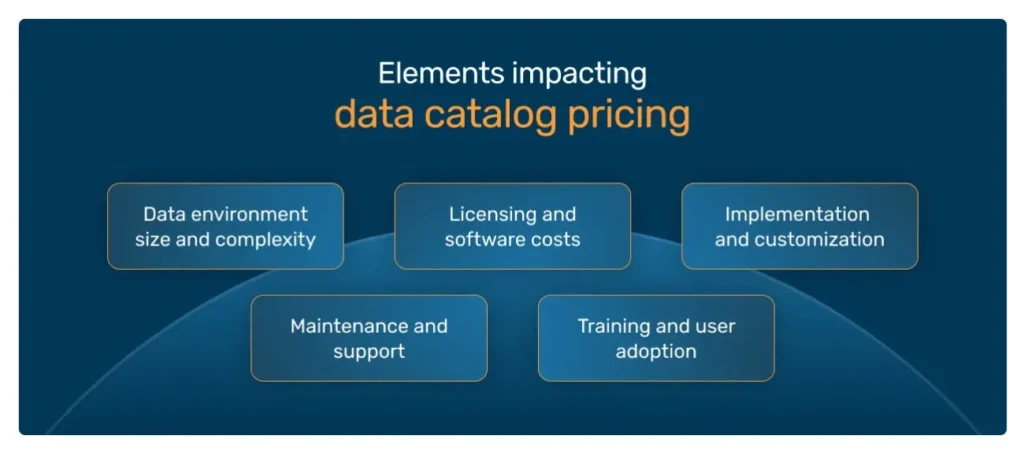
Pricing in enterprise governance platforms can be somewhat opaque, and we do have a dedicated article on Data catalog pricing, so make sure to go there if you’re interested in the topic. But here’s the gist.
For Collibra, key factors include:
- Number of users/licenses: how many active users (analysts, stewards, admins)?
- Feature modules/add-ons: lineage, advanced AI/ML, data marketplace, advanced quality, etc.
- Deployment model: cloud SaaS vs on-premise vs hybrid will affect infrastructure, maintenance, and SLAs.
- Metadata volume/scale: how many assets, how many changes per day, how many data sources?
- Support & SLAs: premium support, uptime guarantees, training, consulting.
- Professional services/onboarding: often, initial deployment, customization, and data modeling carry a separate cost. What makes it absolutely justifiable is hiring experts who know how to optimize deployment and features to effectively cut unnecessary costs, making it an absolutely worthwhile investment, potentially leading to a significantly higher ROI.
(And if you need help with this, reach out – we have experience optimizing Collibra to limit unnecessary costs.)
So, is Collibra Data Catalog right for your organization?
Collibra Data Catalog is a mature, feature-rich platform well suited for organizations that want serious, sustainable data governance – not just a metadata playground.
If your organization is grappling with:
- multiple scattered data sources,
- inconsistent definitions between business and IT,
- regulatory/compliance demands,
- lineage and impact analysis needs,
- low trust in data quality,
…then Collibra is very likely a strong contender.
To move forward, the best next step is to define your Data Catalog requirements (use cases, personas, data sources, governance maturity) and align them with Data Catalog Best Practices. That will help you assess whether Collibra is a good fit, or whether a lighter-weight or more specialized tool makes sense first.
And if you need support, whether it’s defining your requirements or implementing and optimizing the software, reach out. We have many Collibra Data Catalog experts on board who can help you translate your business goals into specific data catalog features for maximum use of what Collibra has to offer.
Frequently asked questions about Collibra Data Catalog
Is Collibra Data Catalog only for large enterprises?
Not necessarily. While Collibra is designed with enterprise needs in mind – scalability, governance workflows, compliance – mid-sized organizations can also benefit if they deal with multiple data sources or regulatory requirements. Smaller teams may find Collibra “too much” unless they already have a governance strategy in place.
How is Collibra different from a simple data inventory tool?
A data inventory lists what data exists. Collibra goes further: it adds business context through glossaries, enforces governance workflows, tracks lineage, monitors quality, and enables collaboration.
Can Collibra integrate with cloud data warehouses, such as Snowflake, Databricks or Google BigQuery?
Yes. Collibra provides native connectors and APIs to integrate with most modern cloud warehouses, BI platforms, and ETL tools. This makes it a strong choice for hybrid and multi-cloud environments.
What’s the difference between Collibra’s business glossary and data dictionary?
The business glossary defines terms and ensures consistent understanding across the business. The data dictionary documents technical metadata, like schemas and data types. Together, they link business concepts to physical data assets.
How much does Collibra Data Catalog cost?
Pricing depends on user licenses, features, metadata volume, and deployment model. While exact pricing isn’t public, organizations should budget for both licenses and professional services for onboarding.
Is Collibra suitable for organizations just starting their governance journey?
It can be, but success depends on readiness. If you don’t yet have clear ownership models, governance policies, or data stewardship defined, you may need to start with smaller initiatives. However, Collibra provides frameworks and workflows that can help structure and accelerate governance maturity.
About the Author

Share this article
Related Articles
See all-

15 November 2025
| Collibra experts for hireWhat is Collibra Edge? A 2025 Explainer
-
15 November 2025
| Collibra experts for hireThe definitive guide to Collibra Data Lineage
-

3 November 2025
| Collibra experts for hireCase Study: Discovering, classifying and cataloging unstructured data for a European bank